

『Flow Meter Sensor Arduino: DIY Pulse Signal Liquid Sensor Projects』Related information(v cone flow meter|rotary gas meter|gallon meter|gear meter|metal tube rotameter|glass tube rotameter|nutating disk meter|transit time ultrasonic flow meter|wedge flow meter|pd meters|hydraulic flow meter|ultrasonic water flow meter|water flow meter|air flow meter|magnetic water flow meter|oxygen flow meter|gas flow meter|argon flow meter|air velocity meter|gasoline flow meter|fuel flow meter|ultrasonic water meter|digital water meter|nitrogen flow meter|solid flow meter|Oxygen tank flow meter|digital water flow meter|diesel fuel flow meter|steam flow meter|02 flow meter|compressed air flow meter|oil flow meter|liquid flow meter)
Flow Meter Sensor Arduino: DIY Pulse Signal Liquid Sensor Projects
Quick Answer
You can connect a flow meter with a pulse output directly to an Arduino digital pin. Count the pulses, convert with the meter K-factor, and you get real-time flow rate and totalized volume. This works for water, diesel, and light chemicals. For industrial custody transfer, Class 1 accuracy, or aggressive media, a pulse signal from a Silver Instruments industrial flow meter gives far better repeatability and long-term reliability.
What Pulse Signal Means in a Flow Meter
A pulse output is one of the simplest signals you can read with an Arduino. Each pulse represents a fixed volume of liquid passed through the meter. The manufacturer gives you a K-factor, for example 100 pulses per liter. Your Arduino code just counts the rising edges on a digital input pin and does the math. No DAC, no 4-20 mA HART, no Modbus. Just a clean square wave that even an Arduino Uno can handle at low frequencies.
Most low-cost plastic turbine flow sensors you see on hobbyist sites have a Hall effect pickup. They output a 5V pulse train. You can wire the signal pin straight to pin 2 or 3 on an Arduino Nano and use interrupt-based counting. Here is the thing. We have seen engineers at small water treatment plants in Vietnam and Indonesia start exactly this way, monitoring filter backwash flow with a $15 sensor and an Arduino Mega. It works fine for non-critical alarm logging. But when the same team needs to control chemical dosing, they move to an industrial electromagnetic flow meter with a validated pulse output.
Why Industrial Pulse Output Sensors Beat Hobby-Grade Units
Hobby sensors use plastic bodies and simple O-ring seals. The internal rotor wears fast if you run hard water or anything with silt. The K-factor drifts over time. The pulse shape degrades when the turbine spins too slow or too fast. An industrial pulse output flow meter from Silver Instruments, such as the oval gear meter for diesel or the turbine meter for clean water, uses stainless steel internals, hard bearings, and a conditioned signal that stays sharp from 0.5 Hz up to 2 kHz.
We ship the same DN15 oval gear meter with a dual-channel pulse output to a lubricant blending skid in Malaysia. Their Arduino-based batch controller reads Channel A for flow rate and Channel B for direction. No noise, no missing counts. The K-factor is laser-etched on the nameplate and verified on a NIST-traceable calibration rig. You get a calibration certificate, not just a sticker.
In practice, most engineers skip the Arduino part once the project needs ATEX Zone 1 compliance or SIL-rated safety loops. But for proof-of-concept, site acceptance tests, or small OEM machines, a pulse signal from a real industrial flow meter gives you the best of both worlds: simple integration with Arduino, Raspberry Pi, or Siemens LOGO, and metrology-grade data.
Wiring a Silver Instruments Pulse Output Meter to Arduino
Our pulse output meters follow the NAMUR or open-collector standard. For a 3-wire model, connect the brown wire to your 24 VDC power supply, blue to GND, and black signal wire to the Arduino digital pin through a 10 kOhm pull-up resistor to 5V. For a 2-wire NAMUR output, use a NAMUR signal conditioner or a simple comparator circuit if you are on a tight budget, but we recommend an isolated converter to protect the Arduino from voltage spikes.
A customer in Nigeria built 50 diesel dispensing units using our oval gear meters with pulse output and Arduino Nano clones. They ran RS485 serial to a small HMI. The total cost per unit was low, but the meter was the one component they refused to downgrade. Because a plastic sensor would have seized after two weeks of diesel with dissolved paraffin.
From DIY Prototype to Full-Scale Deployment
We often see this pattern. A process engineer at a food factory in Thailand starts with an Arduino reading a pulse from a paddle wheel sensor for CIP water. Six months later, the plant manager asks for a system that logs flow, triggers alarms, and sends data to a SCADA via 4-20 mA HART. At that point, the Arduino stays a
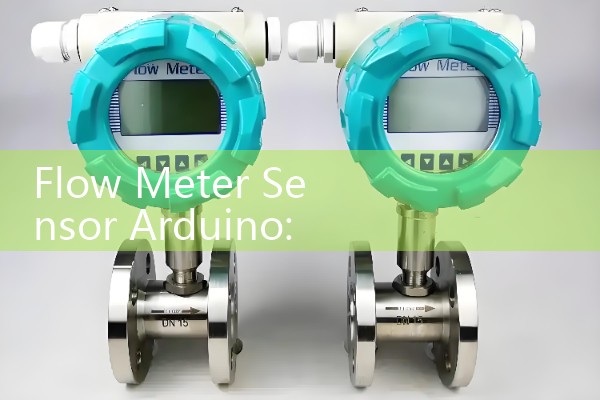
Because our meters support multi-output configurations, you can use the pulse signal for your Arduino project today and add Modbus or HART later without changing the meter. That flexibility saves downtime on sites where production cannot stop.
Typical Applications Where Arduino Pulse Counting Adds Value
Cooling tower makeup water measurement: A site in the Middle East uses our turbine meter with pulse output, connected to an Arduino Opta, to track daily water consumption. The pulse signal feeds into a simple counter, and the data goes to an SD card.
Chemical batch dosing in dyeing machines: A textile SME in India installed our oval gear meter on a dye injection line. The Arduino counts pulses, stops a solenoid valve at the target volume. Repeatability is within 0.5% because the meter K-factor stays flat across the small flow range.
Diesel generator fuel monitoring: An Australian telecoms provider uses our positive displacement meters and an Arduino MKR GSM to send daily fuel consumption via SMS. The pulse output requires zero configuration in the field.
Aquaculture recirculation system flow logging: A shrimp farm in Ecuador measures recirculation pump flow with our electromagnetic flow meter, taking the scaled pulse output to a local Arduino datalogger. The water conductivity is high, so a magnet meter was the only choice.
Selecting the Right Meter for Your Arduino Project
You need three things to pick the correct industrial pulse output meter. Pipe size in DN, flow range in liters per minute or cubic meters per hour, and the liquid. Viscosity above 50 cP rules out turbine meters, you need oval gear. Slurries or conductive liquids above 100 µS/cm guide you toward an electromagnetic meter. Your Arduino can read a 4-20 mA pulse output just as easily as a voltage pulse, so do not sacrifice meter compatibility for signal type.
Send us your pressure in bar, temperature in Celsius, pipe size in DN, and flow range. We will recommend a meter with the correct pulse output configuration and K-factor that matches your Arduino input frequency range. Our typical lead time to Australia, Southeast Asia, and the Middle East is 5 to 10 business days by express courier.
FAQ: Arduino and Flow Meter Sensors
Can I directly connect a flow meter pulse output to an Arduino 5V pin? Yes, if the output is a push-pull 5V signal. For open-collector outputs, use a pull-up resistor. For NAMUR 8.2V signals, use an interface module first.
What is the maximum pulse frequency an Arduino can read reliably? With interrupt-based counting, you can capture up to 10 kHz on standard 16 MHz boards, but we recommend staying below 2 kHz to avoid missing pulses during long processing loops.
Does Silver Instruments provide sample Arduino code? We provide the K-factor and wiring diagrams. Most engineers use the standard pulse counting libraries with attachInterrupt(), and we can share a tested sketch for your meter model.
How do I calibrate a pulse flow meter with Arduino? Start with the factory K-factor. Run a known volume of your actual liquid. Adjust the K-factor in your code until the totalizer matches the measured volume. Our calibration certificates give you the initial confidence.
Can I use one pulse output meter for both Arduino logging and PLC control? Yes, many of our meters provide galvanically isolated dual pulse outputs. One goes to your Arduino, the other to a PLC high-speed counter, with no common ground loops.
For sizing, pricing, and a wiring diagram specific to your Arduino flow sensor project, email [email protected] or call +86-135-1213-1526. You can also reach us on WhatsApp at 86-135-12131526 or WeChat at +86 13512131526. Mention your liquid type and target K-factor range.
 Hot Blog
 Related AD